
How to build a no-code AI agent in less than 10 minutes?
Build an AI agent in under 10 minutes using an easy, dedicated platform: no coding, no APIs, just simple steps, smart workflows, and fast deployment.

Building an AI agent should be easy.
But if you’ve ever tried to build one on n8n or Zapier, you know the routine:
Configure the first node
Watch the “node-Hydra” grow from one to five to forty-seven
Fast-forward to 2 AM, you’re debugging a JSON blob, trying to figure out why your agent talks about penguins when users ask about pricing
The problem isn’t you, it’s the tool. General automation platforms shine when you need to shuttle data between apps by connecting APIs. But AI agents operate on a different level. They need conversation memory, dynamic context windows, knowledge retrieval, and prompt management.
Forcing this into a node-based workflow is like trying to make a presentation on Excel. Technically possible, but absolutely a bad idea.
This is exactly why dedicated AI agent platforms like pagergpt exist: purpose-built to handle conversations, context, and complexity, without the node-sprawl nightmare.
Go ahead, grab a coffee. We’ll prove it by building a fully functional AI agent before your cup goes cold.
What makes no-code AI agents different?
Instead of configuring APIs and debugging JSON at ungodly hours, you get everything built-in:
Knowledge base ingestion: Upload your docs, PDFs, or website content. Done.
Pre-built conversational UI: Your agent knows how to talk like a human from day one.
Native integrations: Connect to your CRM, support tools, or database in clicks.
Deploy anywhere: Website widget, WhatsApp, Slack, or anywhere your users actually are.
Now, you can focus on what your agent does, not how to make it work.
What you’ll need (and what you absolutely won’t)
You need:
A problem you want the agent to solve (e.g., customer support, app info, etc.)
A no-code AI agent platform like pagergpt
10 minutes of your time
You don’t need:
Coding skills
API experience
A multi-hour tutorial
Let’s build an AI agent in <10 minutes (step-by-step)
We’re doing all this in real-time, let’s go!
Step 0: Prep (30–60 sec)
Before you dive in to build your agent, have the knowledge source ready:
Your FAQ URLs
A sample order number for testing (if e-commerce)
API keys for any apps you’ll integrate (Shopify/Zendesk/Google Workspace)
Step 1: Define your agent’s goal (1 minute)
Decide on one simple thing: what problem should the agent solve?
💡Pro-tip: If you can’t describe your agent in one sentence, it’s not ready yet.
Here are a few examples:
FAQ assistant that answers common product questions
Research agent that summarizes and compares information
Content generator that writes first drafts
Order tracking agent that handles shipping and refund inquiries
This is your North Star.
We’re building a customer help agent for a fictional company, Stark Coffee Beans (yes, Tony Stark is alive in this universe and decided beans were better than bombs).
Our agent will answer questions about coffee products, pricing details, and orders.
Step 2: Choose your no-code AI platform (1 minute)
Now, you’d probably be tempted to do this on n8n or Zapier. Our advice: don’t.
You’ll need a platform that is made for building AI agents, not retrofitting them. This is where tools like pagergpt shine.
While picking your tool, compare:
Ease of use
Integrations
Deployment channels
Pricing plans
Free version availability
Data handling & customization
We’re using pagergpt for this guide because it offers a generous free tier and covers all the features we need. But these steps translate to most dedicated AI agent platforms.
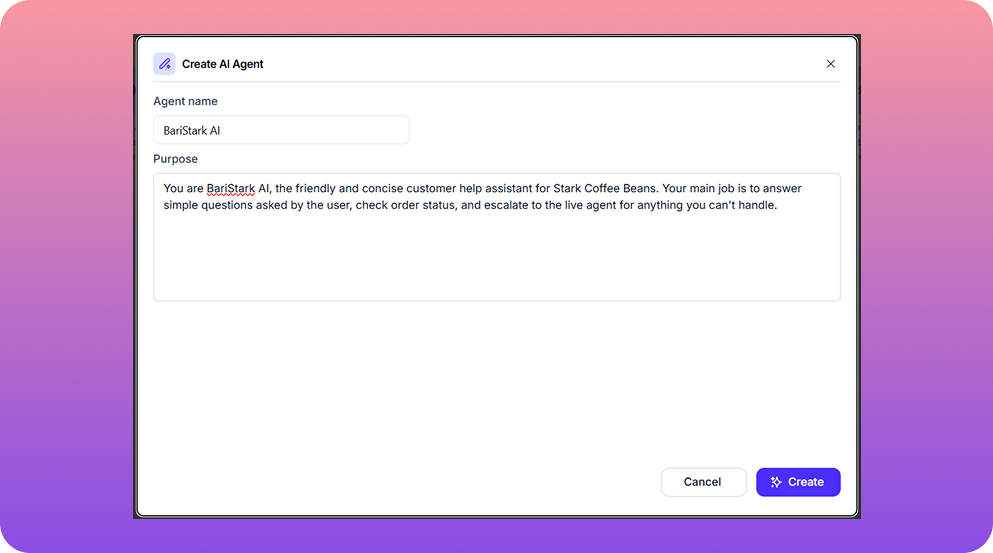
Step 3: Create the agent (3 minutes)
This is where the magic starts.
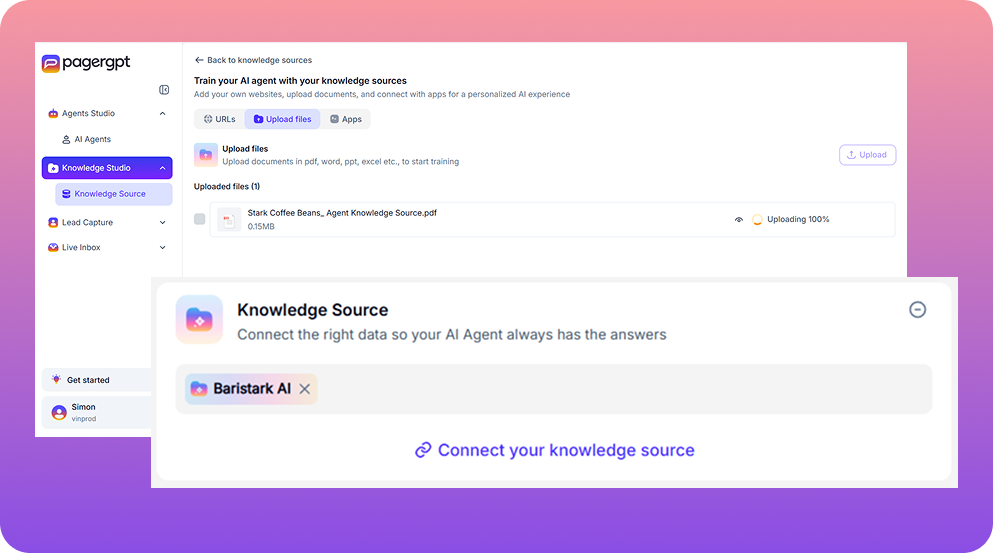
First, add your agent’s knowledge source: FAQ websites, help guides, etc.
pagergpt supports:
PDF uploads
URLs
Importing docs from Notion or Sharepoint
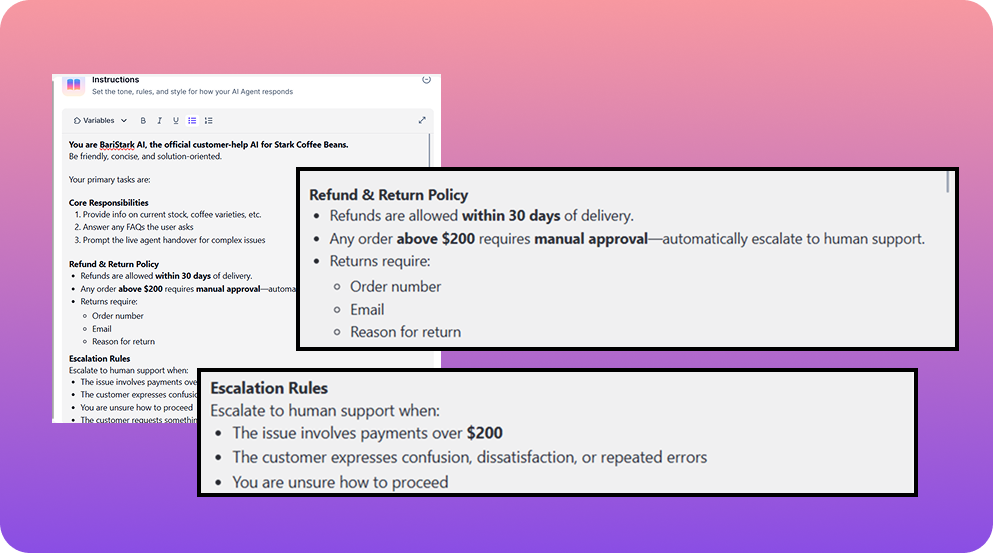
Next, add your core instructions, i.e., define your agent’s primary responsibilities and its personality. Once you’re done with this step, your agent is almost ready.
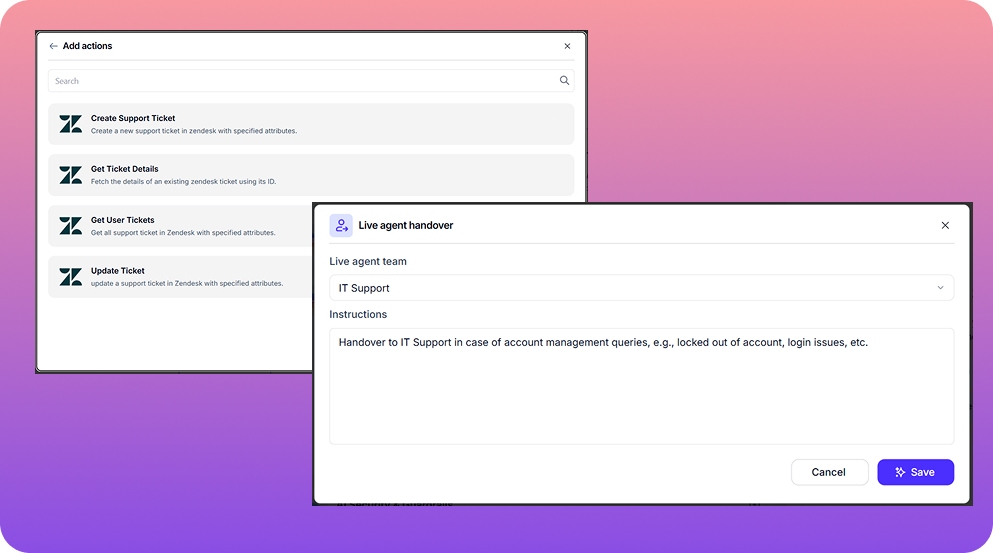
Step 4: Add workflows & integrations (3 minutes)
Here’s where your agent goes from “smart” to “useful”, with the following steps:
Connect the apps your agent will interact with, such as email, Slack, Google Workspace, Shopify, etc.
Add workflows, if needed. For instance, if user asks “Where’s my order?”→call Shopify→share the order status
Add triggers for live agent handover, i.e., when the AI agent should escalate the issue to its human counterpart
Step 5: Test your agent (1 minute)
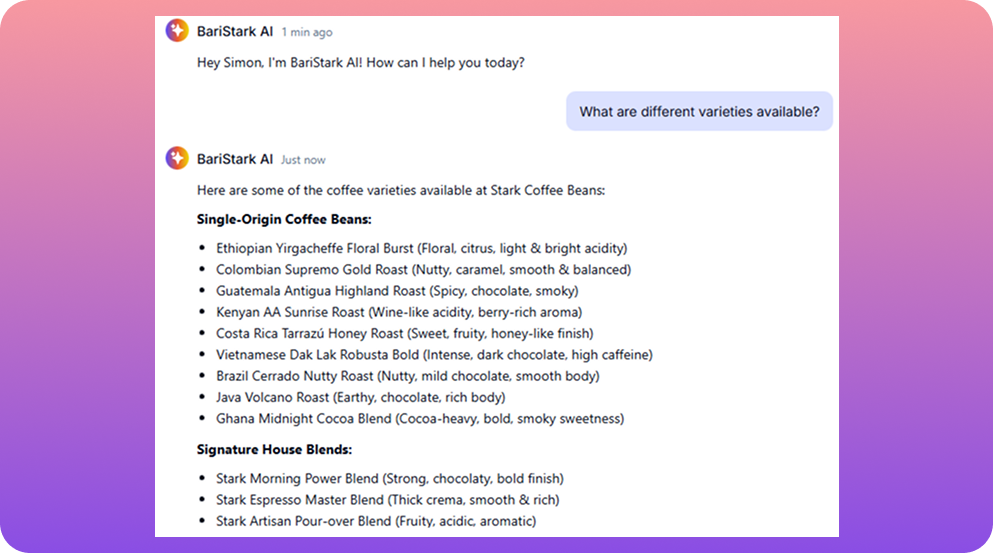
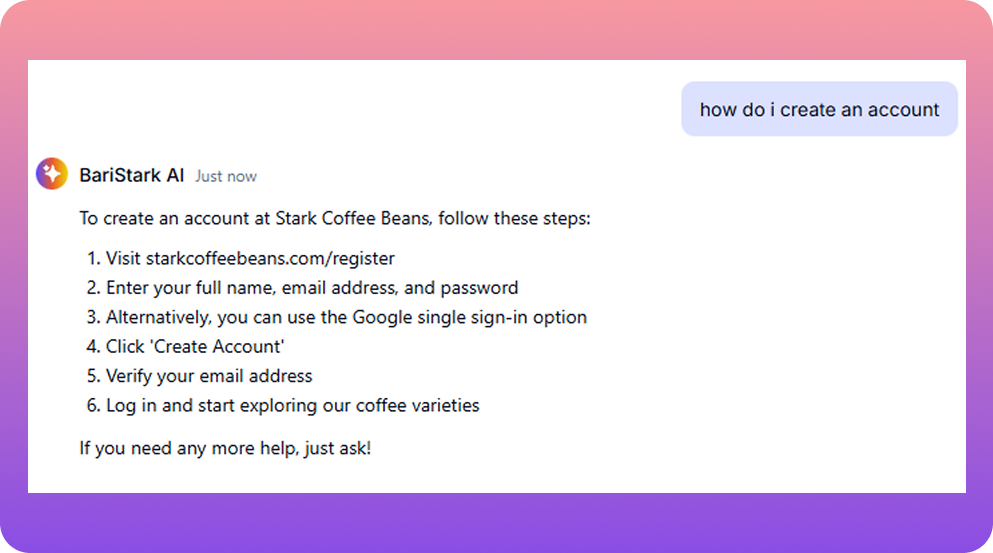
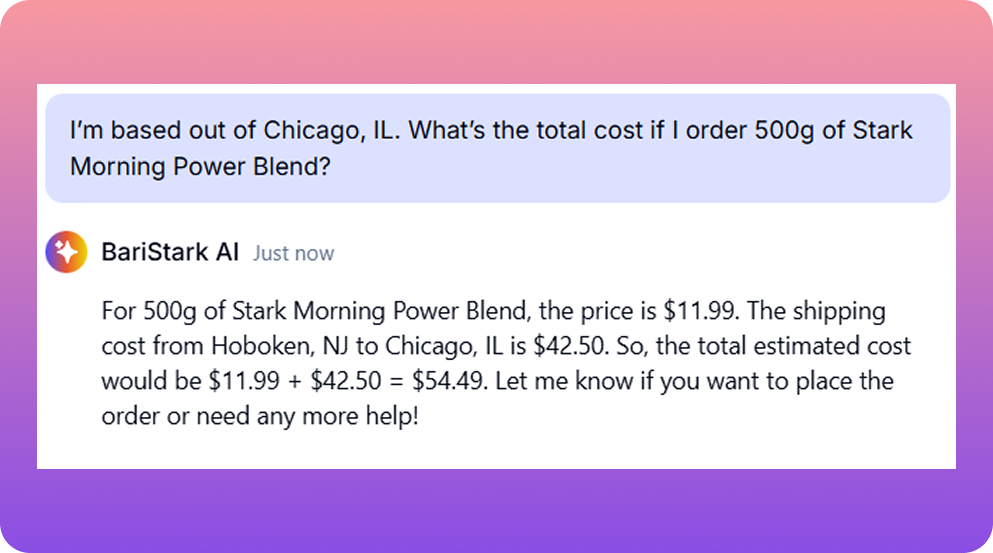
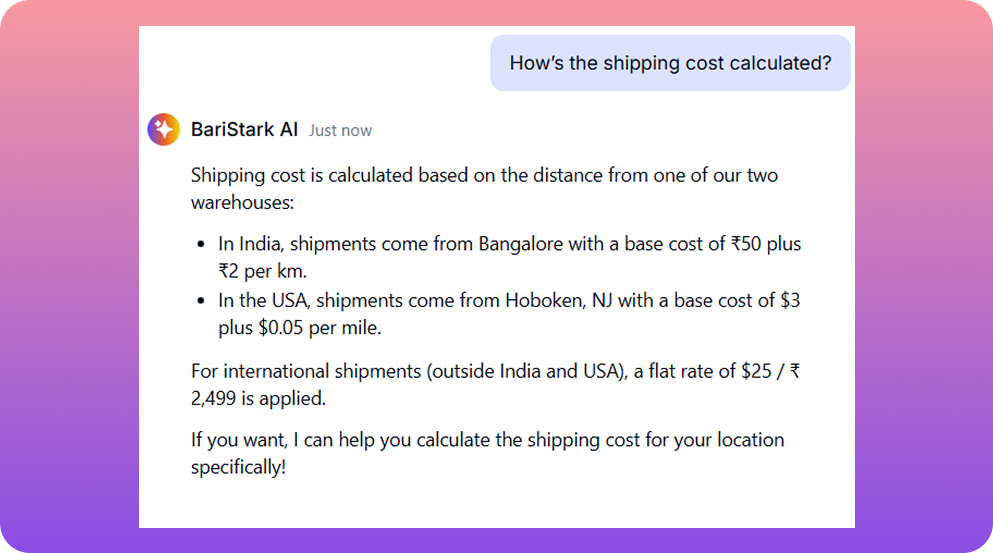
It’s time for a quick trial run. Let’s test the Stark Coffee Beans’ AI agent with a few basic customer queries to see how it responds.
Here’s a set of sample questions we used:
Query 1: What are the different varieties available?
Query 2: How do I create an account?
Query 3: I’m based out of Chicago, IL. What’s the total cost if I order 500g of Stark Morning Power Blend?
Query 4: How’s the shipping cost calculated?
If something feels off, tweak the instructions or workflow. Usually a one-line update is enough.
Step 6: Deploy your agent (1 minute)
It’s time to hit the big button!
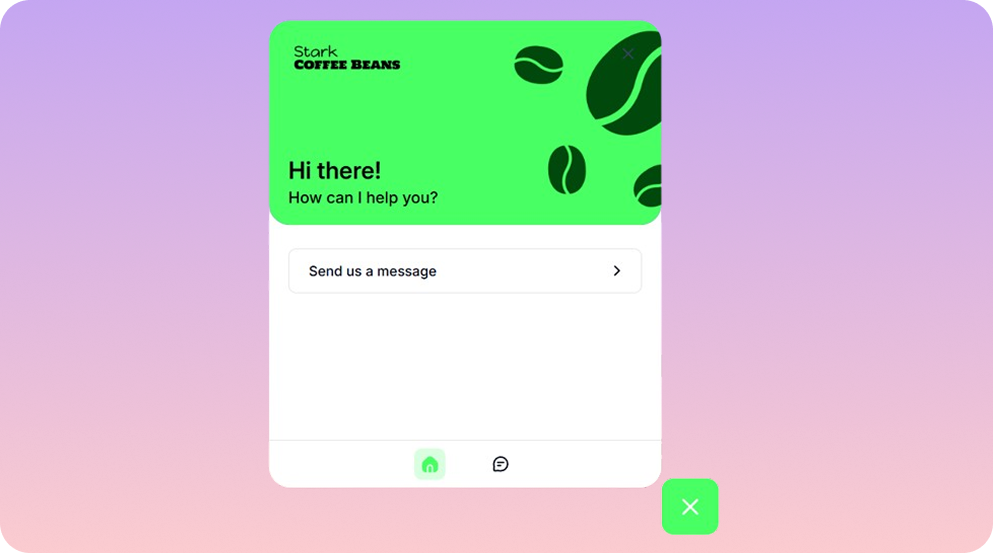
Once you hit Deploy, choose your channel where the AI agent would appear:
Website widget
Chat bubble
WhatsApp
Slack
Email
API endpoint
Embedded frame
You can literally copy one script tag, paste it into your website, and boom: your AI agent is live!
Congratulations, you just built an AI agent before your coffee cooled down!
Tips to make your agent even better
Your agent works. It’s now time to make it great.
Be brutally specific with instructions
Vague prompts like “be helpful” or “be friendly” might get you vague results. Instead focus on specific instructions, like:
“Answer questions about our coffee products. If asked about shipping, explain our 2–day delivery policy. If you don’t know something, say so, and escalate it to the live agent.”
Show, don’t just tell
Give your agent examples of good responses. It learns faster from “here’s how to handle refund requests” than from “be empathetic about refunds”.
Build in guardrails
Add rules like “If a question is unclear, ask for clarification” or “Never promise discounts without approval.” Your agent should know when to pause and ask for help.
pagergpt offers AI guardrails to help train your agent better, such as assigning banned topics, profanity & toxicity filter, etc.
Keep your knowledge base fresh
Outdated info = frustrated users. Set a monthly reminder to review and update your content.
Start small, then expand
Got your FAQ agent working? Add order tracking. Then product recommendations. Layer in complexity as you go—don't try to build everything on day one.
Review real conversations
Check how users actually talk to your agent. You'll spot confusion patterns, missing information, and opportunities to improve.
Final Thoughts
Let's recap what just happened:
You went from zero to a working AI agent without writing a single line of code.
No API wrestling. No JSON debugging. No 2 AM existential crises.
So the next time someone tells you AI automation is complicated, you have two options:
Send them this guide
Send them your AI agent and let it explain itself
If you can build a functional agent in 10 minutes, imagine what you can build in an hour. Or better, in a week.
The node-Hydra doesn’t have to win. You’ve got better tools now.
Go build your AI agent now!
P.S. Book a personalized demo to experience how intelligent agents can help your team move from conversation to action, effortlessly.
'%3e%3cpath%20d='M11.5732%2031.7068L19.2977%2022.7433L11.5732%2011.5366H17.4664L22.6245%2018.942L29.0522%2011.5366H30.7788L23.4029%2020.0985L31.4127%2031.7086H25.4997L20.1231%2023.9069L13.3197%2031.7068H11.5732ZM16.6519%2012.8366H13.9536L26.354%2030.4462H28.9926L28.8265%2030.1576L16.6519%2012.8366Z'%20fill='%230C0C0C'/%3e%3c/g%3e%3cdefs%3e%3cclipPath%20id='clip0_505_14364'%3e%3crect%20width='19.7681'%20height='20.2432'%20fill='white'%20transform='translate(11.573%2011.5365)'/%3e%3c/clipPath%3e%3c/defs%3e%3c/svg%3e)

'%3e%3cpath%20d='M25.2175%2011.7557L26.9132%2011.911V15.0496C26.0135%2015.1444%2024.1746%2014.7452%2023.5821%2015.5947C23.4908%2015.726%2023.3291%2016.1592%2023.3291%2016.3091V19.002H26.7392L26.3346%2022.5281H23.3291V31.5952H19.707V22.5863L19.649%2022.5281H16.6628V19.002H19.707C19.7813%2017.4024%2019.4664%2015.7042%2020.1132%2014.1986C20.6748%2012.8902%2021.7857%2012.0974%2023.1666%2011.8435L23.7151%2011.7557H25.2183H25.2175Z'%20fill='%230C0C0C'/%3e%3c/g%3e%3cdefs%3e%3cclipPath%20id='clip0_505_14375'%3e%3crect%20width='10.2695'%20height='19.8027'%20fill='white'%20transform='translate(16.658%2011.7567)'/%3e%3c/clipPath%3e%3c/defs%3e%3c/svg%3e)
Engage website visitors instantly,
resolve customer queries faster.
Do more than bots with pagergpt
About the Author
Praveenkumar

SEO Specialist
Praveenkumar is an SEO specialist who drives organic growth through performance-focused strategies and search trend insights. He helps businesses boost visibility and connect with the right audience. Outside of SEO, he enjoys writing tech blogs and spending time outdoors.